VesselsFlow / PMS
One maintenance system. On board and ashore.
VesselsFlow PMS gives ship managers a clear view of every vessel's technical status and equips crews with an onboard app that works even offline. Manage maintenance jobs, work orders, defects, spare parts, certificates and dry docking, all in one system.
- Screen
- Fleet overview, VesselsFlow PMS
- Shows
- One row per vessel; tap any cell to drill down
Your fleet at a glance. Your priorities in focus.
See every vessel on one screen, with colour-coded status indicators for maintenance, defects, certificates, purchasing, inventory, equipment condition and inspections. Equipment health scores, failure histories and recommendations help you identify which maintenance jobs to prioritise.
- Navigate from fleet overview to any vessel, department, machine or job in just a few taps
- See overdue tasks, critical issues and pending approvals at a glance
- Screen
- Analytics, VesselsFlow PMS
- Shows
- Health index, failure analysis and recommendations
Vessel and engine room plans
Each vessel has a visual layout tailored to its type, whether a bulk carrier, tanker or container ship. Colour-coded spaces and machinery make maintenance priorities easy to spot.
- Navigate holds, tanks, decks, accommodation and the engine room
- Tap any machine to view its equipment details and maintenance jobs
- Screen
- Vessel plan, VesselsFlow PMS
- Shows
- Spaces coloured by overdue jobs and open defects
Every machine organised. Every job scheduled.
Structure your equipment using SFI or your own codes, flag critical machinery, track running hours and identify each machine with a QR label. Schedule maintenance by date, running hours, cycles, condition or a combination of triggers.
- Copy equipment structures and maintenance jobs to sister vessels
- Require two-level approval to postpone maintenance on critical equipment
- Screen
- Equipment, VesselsFlow PMS
- Shows
- Maintenance jobs, history, health and status of one machine
Track running hours. Put manual data to work.
Crew log running hours daily, with checks that reject backward readings or excessive jumps. The PMS forecasts when maintenance is due for each machine. During the job, engineers can follow overhaul steps, consult torque values and tolerances from the manual, and record measurements at sign-off.
- Forecast maintenance due dates from each machine's running hours
- Record measurements against manual torque values and tolerances at sign-off
- Access vessel-specific lubrication charts with points, lubricants, quantities and intervals
- Screen
- Running hours, VesselsFlow PMS
- Shows
- Daily readings and the jobs they bring due
- Screen
- PMS job, VesselsFlow PMS
- Shows
- Overhaul steps and torques taken from the manual
- Screen
- Lube oil chart, VesselsFlow PMS
- Shows
- Every lubrication point of the vessel
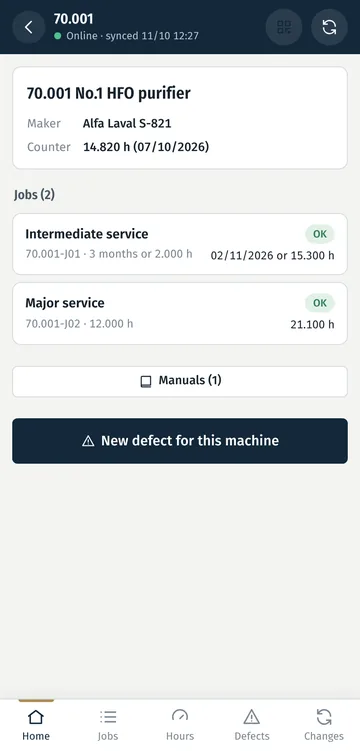
Scan the machine. Access everything you need.
Print QR labels for every machine across a vessel in one batch, then attach each label to its equipment. A scan with the ship app opens the machine's maintenance jobs, open defects, sub-systems and manuals.
- Access equipment data offline, directly from the ship's tablet
- Report a machine-specific defect in just two taps
- Open the full equipment page when scanning as an office user
Every job tracked. Every completion documented.
Track work orders from planning through execution, completion, review and approval. Engineers sign off with running hours, equipment condition, measurements, spare parts used and photos.
- Link risk assessments and permits to work directly to each job
- Print job sheets ready for onboard use
- Screen
- Work order, VesselsFlow PMS
- Shows
- Status, approvals and permits for one job
From defect report to resolution
Report defects from the office or onboard app, with photos to document the issue. Track each case through assessment, spare parts, repair and testing, and create a linked work order or requisition in one step.
- Track unresolved defects by age and analyse root causes
- Use AI to suggest possible causes based on your manuals and fleet history
- Screen
- Defect, VesselsFlow PMS
- Shows
- Status, report and spares for one defect
Spare parts and purchasing. Fully connected.
Track each vessel's stock against minimum levels, with automatic deductions when spare parts are used in a work order. Manage requisitions through two-level approval, compare quotations side by side and update stock as deliveries are received.
- Follow every purchase from requisition and quotation to order and delivery
- Monitor vessel budgets and supplier performance
- Screen
- Procurement, VesselsFlow PMS
- Shows
- Open requisitions, approvals and budget use per vessel
Stay ahead of certificates, surveys and inspections
Track certificate expiry dates and survey windows with timely reminders. Manage internal, superintendent, ISM, PSC, vetting, class and flag inspections using structured checklists, and turn findings into defects or work orders.
- Complete inspection checklists on board, even offline
- Track every finding through corrective action and verified closure
- Screen
- Certificates and surveys, VesselsFlow PMS
- Shows
- Expiring certificates and survey windows across the fleet
Monitor condition. Act before limits are reached.
Track vibration, temperatures, oil analysis and other readings against defined limits. Trends help forecast when values may reach those limits, while out-of-range readings can trigger a defect or work order.
- Enter readings on board or import laboratory results
- Use equipment limits from the manufacturer's manual
- Screen
- Condition monitoring, VesselsFlow PMS
- Shows
- Readings, limits and the forecast for one measuring point
Every dry dock. Under control.
Build dry dock specifications, add approved PMS jobs, compare shipyard quotations and track actual costs against budget. Manage progress photos, punch lists, sea trials and final close-out, all within one project.
- Screen
- Dry dock, VesselsFlow PMS
- Shows
- Budget against actual and the job specification
Your manuals. Actionable intelligence.
Upload a machine's manuals and let AI propose equipment records, maintenance jobs, spare parts and operating limits. Compare manufacturer-recommended intervals with your PMS schedules, and give engineers answers linked to the relevant manual pages.
- Review and approve every AI suggestion before it is applied
- Investigate faults with AI insights drawn from manuals, maintenance history and condition readings
- Screen
- Compare with manufacturer, VesselsFlow PMS
- Shows
- Missing jobs and intervals that differ from the maker
Keep your crew working, even offline
The ship app stores maintenance jobs, work orders, running hours, defects, measurements, inspections and manuals directly on a tablet or phone. Crew can keep working without internet, with updates syncing automatically when connectivity returns.
- Complete and sign off jobs with measurements and photos
- Read and search downloaded manuals offline
- Register each tablet to its vessel from the office
More tools. All included.
Additional tools for your technical department, included as standard, with no extra modules to purchase.
Clear reports. Better decisions.
Access 15 reports covering upcoming maintenance, job status, costs and more, ready to export in Excel, PDF or CSV.
Connect your ERP. Keep data moving.
Integrate through a REST API with automatic retries and signed messages, or exchange data via Excel when no API is available.
Critical equipment. Clear accountability.
Escalate critical equipment issues from the chief engineer to the superintendent and technical manager through a defined chain of responsibility.
The right access. For every role.
Set precise permissions for shore and onboard teams, with two-factor authentication through an authenticator app for every user.
Every change. Fully traceable.
See who changed what and when, with the previous value recorded in the audit trail.
Your language. Across every task.
Each user can choose English or Greek for their interface, emails and printed documents.
Crew knowledge. Connected to every job.
Pin notes and photos to manual pages, making crew insights available in related jobs and AI answers.
Plan spares. Track reliability.
Turn spare parts requirements for upcoming jobs into requisitions, and compare failures and mean time between failures (MTBF) across sister vessels.
Your data. Your control.
Export all company data at any time, with a data processing agreement on request.
See VesselsFlow in action
Try it yourself free for 30 days, no credit card needed, and see how it works with your fleet. See pricing
What happens next
Hear from us within one working day
to activate your account.
Explore the PMS and onboard app
See the workflow in action and get answers to your team's questions.
Trial account
If VesselsFlow meets your needs, we'll set up a company trial account so you can explore it together.