VesselsFlow / Manuals AI
From manuals to PMS-ready data in hours, not months
Drag and drop your vessel's scanned or digital PDF manuals. Manuals AI reads text, tables and drawings to extract equipment details, maintenance jobs, spare parts, torque values, operating limits and lubricant specifications. Get structured Excel files ready for your PMS and ERP, with every row linked to its source page.
4. Planned maintenance schedule
Check gear oil level and condition Weekly
Clean the sludge outlet, check discharge Monthly
Intermediate service (IS): clean bowl and disc stack, renew bowl seals 2 000 h
Major service (MS): IS plus spindle bearings, friction pads, flat belt 8 000 h
Change gear lubricating oil 1 500 h or 6 months
Clean feed pump strainer Monthly
Calibrate water transducer WT-2 12 months
| Equipment | Job | Interval | Page |
|---|---|---|---|
| Separator | Check gear oil | 1 week | p. 4 |
| Sludge outlet | Clean, check discharge | 1 month | p. 4 |
| Separator bowl | Intermediate service | 2,000 h | p. 4 |
| Bowl spindle | Major service | 8,000 h | p. 4 |
| Gear housing | Change lube oil | 1,500 h / 6 mo | p. 4 |
| Feed pump | Clean strainer | 1 month | p. 4 |
| Water transducer | Calibrate WT-2 | 12 months | p. 4 |
7 jobs, 12 spare parts, 6 torques from 7 pages
From PDF to structured Excel in three steps
Skip manual data entry and lengthy implementation projects. Process a single manual or upload forty at once.
Drop your manuals. Start the process.
Drag and drop your PDFs and assign them to the vessel and equipment. Manuals AI takes over, using OCR to read scanned pages.
Let AI do the reading.
AI processes text, tables and technical drawings page by page in the background. Close your browser and return when you're ready.
Review. Export. Put your data to work.
Verify extracted data against its source pages, make any corrections and download structured Excel files for your PMS or ERP.
From a page in the manual to a row in your spreadsheet
Explore a sample fuel oil separator manual alongside the structured Excel data extracted from it. This example uses a demonstration document.
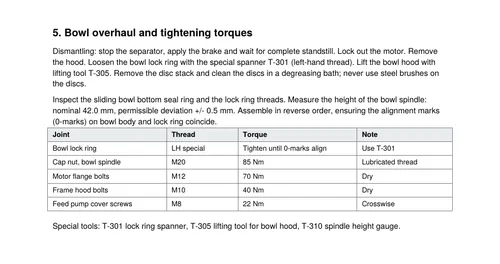
Input: page 7 of the DMS-30 separator manual, the spare parts list.
| Equipment | Part no. | Description | Qty | Drawing | Page |
|---|---|---|---|---|---|
| Separator bowl | DMS-30-1101 | Bowl hood seal ring | 1 | 30-100 | p. 7 |
| Separator bowl | DMS-30-1102 | Sliding bowl bottom seal ring | 1 | 30-100 | p. 7 |
| Separator bowl | DMS-30-1103 | O-ring, distributor | 2 | 30-100 | p. 7 |
| Separator bowl | DMS-30-1110 | Disc stack, complete | 1 | 30-100 | p. 7 |
| Bowl spindle | DMS-30-2201 | Spindle top bearing | 1 | 30-200 | p. 7 |
| Bowl spindle | DMS-30-2202 | Spindle bottom bearing | 1 | 30-200 | p. 7 |
| Drive | DMS-30-2210 | Friction pad set | 1 | 30-200 | p. 7 |
| Drive | DMS-30-2215 | Flat belt | 1 | 30-200 | p. 7 |
| Feed pump FP-30 | DMS-30-3310 | Feed pump strainer element | 1 | 30-300 | p. 7 |
| Kits | DMS-30-K-IS | Intermediate service kit (items 1, 2, 3) | 1 | – | p. 7 |
| Job | Interval | Trigger | Responsible | Spares | Page |
|---|---|---|---|---|---|
| Check gear oil level and condition | 1 week | Calendar | 3rd Engineer | – | p. 4 |
| Clean sludge outlet, check discharge function | 1 month | Calendar | 3rd Engineer | – | p. 4 |
| Intermediate service: clean bowl and disc stack, renew bowl seals | 2,000 h | Running hours | 2nd Engineer | DMS-30-K-IS | p. 4 |
| Major service: renew spindle bearings, friction pads, flat belt | 8,000 h | Running hours | 2nd Engineer | DMS-30-K-MS | p. 4 |
| Change gear lubricating oil | 1,500 h / 6 months | Whichever first | 3rd Engineer | – | p. 4 |
| Calibrate water transducer WT-2 | 12 months | Calendar | ETO | – | p. 4 |
| Check bowl spindle vibration | 3 months | Calendar | 2nd Engineer | – | p. 4 |
| Joint / measurement | Thread | Value | Note | Page |
|---|---|---|---|---|
| Cap nut, bowl spindle | M20 | 85 Nm | Lubricated thread | p. 5 |
| Motor flange bolts | M12 | 70 Nm | Dry | p. 5 |
| Frame hood bolts | M10 | 40 Nm | Dry | p. 5 |
| Feed pump cover screws | M8 | 22 Nm | Tighten crosswise | p. 5 |
| Bowl lock ring | LH special | 0-marks aligned | Spanner T-301 | p. 5 |
| Bowl spindle height | – | 42.0 ± 0.5 mm | Gauge T-310 | p. 5 |
| Parameter | Normal | Warning | Action | Page |
|---|---|---|---|---|
| Spindle vibration velocity | < 7.1 mm/s | 7.1 mm/s | Stop above 11 mm/s | p. 4 |
| Separation temperature, HFO | 98 ± 2 °C | – | Raise temperature if water in clean oil | p. 2, 6 |
| Back pressure, clean oil outlet | 1.5–2.0 bar | High back pressure alarm | Open valve, clean outlet line | p. 2, 6 |
| Operating water pressure | 2–6 bar | – | Check if oil leaks at sludge outlet | p. 2, 6 |
| Motor current, running | approx. 17 A | – | Feed only after full speed | p. 3 |
| Point | Lubricant | Quantity | Change | Page |
|---|---|---|---|---|
| Spindle gear housing | ISO VG 220 | 4.5 l | 1,500 h or 6 months | p. 2, 4 |
One manual, all the data you need
Each one is an Excel file your technical department already knows how to read. Pick the sheets you need for each manual.
Equipment register
Organised records of machinery, systems, manufacturers, models and technical specifications.
Planned maintenance
Maintenance tasks with service intervals, running-hour triggers and condition-based requirements.
Spare parts
Part numbers, descriptions and quantities, linked to their reference drawings.
Clearances and torques
Nominal values, tolerances, wear limits, tightening torques and hydraulic pressures.
Alarms and operating limits
Set points, alarm thresholds and shutdown values for equipment monitoring.
Lubrication data
Lubricant grades, quantities and change intervals, ready for your vessel's lubrication chart.
Overhaul procedures
Step-by-step instructions ready to build into maintenance jobs.
Technical images and drawings
Drawings and exploded views extracted from manual pages, classified and linked to the relevant equipment.
Fleet-wide parts index
A searchable index of part numbers from every manual, across your fleet's machinery and vessels.
Nothing is approved until your engineer approves it
Review every extracted row alongside the manufacturer's wording and source page. Correct values, confirm accurate entries, add notes or create additional rows where needed. Your edits and additions are included in the final export.
| # | Equipment | Maintenance job | Interval | Page | Status |
|---|---|---|---|---|---|
| 1 | Separator | Check gear oil level and condition | 1 week | p. 4 | Verified |
| 2 | Separator bowl | Intermediate service: clean bowl and disc stack, renew bowl seals | p. 4 | Corrected | |
|
Maker's wording
“Intermediate service (IS): clean bowl and disc stack, renew bowl seals (IS kit). Interval 2 000 h.” Correction
2,500 h read from a smudged scan; corrected to 2,000 h by the 2nd Engineer. Note
Use kit DMS-30-K-IS. Last done at 13,300 h. | |||||
| 3 | Bowl spindle | Major service: bearings, friction pads, flat belt | 8,000 h | p. 4 | Verified |
| 4 | Gear housing | Change gear lubricating oil | 1,500 h / 6 months | p. 4 | Verified |
| 5 | Water transducer | Calibrate WT-2 | 12 months | p. 4 | Unverified |
Stop searching manuals, ask them
Ask questions in plain English or Greek and get answers drawn from your own manuals, linked to the source page. Search within one vessel or across your fleet.
- Answers grounded in your manuals, with page references
- Relevant crew notes displayed alongside each answer
- Supports both scanned and digital manuals
What torque for the bowl spindle cap nut, and is the thread lubricated?
The cap nut on the bowl spindle is M20 and is tightened to 85 Nm with a lubricated thread.
Before reassembly, check the spindle height: nominal 42.0 mm, permissible deviation ±0.5 mm, using gauge T-310.
Chief Engineer, 30/01: measured 42.2 mm at the last overhaul, within limits.
The crew writes on the manual, and the manual remembers
Add measurements, manufacturer-approved deviations and photos directly to any manual page or extracted data row. Row-level notes follow the maintenance job into the export, preserving practical knowledge for the next engineer.
On this page
Lock ring spanner T-301 is kept in the purifier room tool board, drawer 2.
2nd Engineer, 14/03Spindle height measured 42.2 mm at the last overhaul. Photo attached.
Chief Engineer, 30/01PhotoOn data rows
Maker confirmed by email that 85 Nm also applies to the new spindle version.
Superintendent, 21/05Kit DMS-30-K-IS ordered for both sister vessels in one PO.
Technical manager, 08/04Compare manuals. See what changed.
Compare manuals across vessels, manufacturers or editions. Using the extracted data, Manuals AI highlights differences in maintenance intervals, operating limits and tasks, including jobs listed in only one manual.
| Item | A | B | Status | Note |
|---|---|---|---|---|
| Turbine side cleaning | Clean during operation, 100–200 h | Wash under operation, 250 h | Difference | Same task, B washes less often on an identical turbocharger. |
| Lube oil filter elements | Clean when differential pressure is high | Clean when pressure is outside 0.4–0.5 MPa | Difference | B has a specific pressure trigger. |
| Governor hydraulic fluid | First after 1,000 h, then every 3,000 h or 6 months | – | Only in A | No governor fluid change appears in B. |
| Cylinder head bolts | – | Retighten in firing order, 12,000 h | Only in B | Engine-core maintenance missing from A. |
| Lube oil cooler | Clean at overhaul | Clean at overhaul | Same | – |
Exportable to Excel
One part. Multiple vessels. A clearer purchasing picture.
The same spare part can appear in several manuals under the same manufacturer's code, and still be ordered separately for different machines and vessels.
Manuals AI brings matching part numbers together across your fleet, helping your team identify shared components, coordinate purchasing and avoid duplicate orders.
This consolidated view also helps engineers build a critical spares list to support equipment reliability.
| Code | Manuals | Vessels | Machines |
|---|---|---|---|
| FE-2210-08Lube oil filter element | 3 | 4 | 8 |
| OR-125-NBRO-ring 125 x 3, NBR | 2 | 3 | 5 |
| DMS-30-1102Sliding bowl bottom seal ring | 2 | 2 | 4 |
| BT-1225Backup battery, control unit | 2 | 2 | 3 |
Your fleet. Its manuals. One connected view.
Link every manual to its vessel and equipment. A colour-coded fleet map shows manual coverage for each ship, making gaps easy to spot. Share one manual across matching equipment on sister vessels to avoid duplicate work, and view AIS vessel positions alongside each ship's technical library.
- NORDIC AURORA6 manuals, 14 exports
- AEGEAN TRADER4 manuals, 9 exports
- PACIFIC MERIDIANshares 3 manuals with AEGEAN TRADER
- ATLANTIC PIONEER5 manuals, 11 exports
- CORAL EXPRESSno manuals uploaded yet
Sample fleet: names and routes are illustrative. In the platform, positions come from the AIS network.
Good to know
| Input | Digital or scanned PDFs, including manuals spanning hundreds of pages |
|---|---|
| Output | Structured Excel (.xlsx) files organised by data type and vessel |
| Fleet | Manuals linked to vessels and equipment, with shared manuals across sister vessels |
| Access | Company-only access, role-based permissions and two-factor authentication |
| Storage | Files stored privately, outside publicly accessible web folders |
Questions
Does it work with scanned, paper-only manuals?
Yes. Manuals AI uses OCR to read scanned pages and extract their data. If your manuals are still on paper, our on-site digitalization team can scan them for you.
How do I know the data is right?
Every extracted row links to its source page for easy checking. Clear status labels (verified, unverified or corrected) show what has been reviewed, with every correction recorded for traceability.
Is my data used to train AI models?
No. Your manuals are processed through business AI APIs that do not use customer data for model training. Access to your manuals is restricted to your company.
Which ERP formats do you support?
Exports use a standard Excel format. Share your ERP's import template, and we'll map the columns to match your system's requirements.
Do I need VesselsFlow PMS?
No. Manuals AI works independently, delivering structured Excel files for your existing systems. If you use VesselsFlow PMS, the extracted data can flow directly into it for review and approval.
Try it on one of your manuals
Send us one manual and the data you need from it. We will send back the Excel files so you can judge the result.